Table of Contents
When was the last time you actually closed Chrome? If you’re the type who keeps 40 tabs open for a week, there’s a good chance the browser has downloaded an update and is just sitting there, waiting for a restart.
That matters this week. Chrome 157 fixes 213 security holes. Here’s what’s in it, which version number you should see, and how to make sure the fix is really running.
What Chrome 157 fixes
Google released Chrome 157 for desktop on November 4, 2026. According to PCWorld’s breakdown of the release notes, it closes 213 vulnerabilities. Google’s own teams found 130 of them, and outside researchers reported the rest, earning $31,000 in bounties so far.
| Severity | Number of flaws |
|---|---|
| Critical | 7 |
| High | 77 |
| Medium | 75 |
| Low | 54 |
The bug types worth knowing
Use-after-free bugs top the list with 45 entries, and four of the seven critical flaws fall into that category. These happen when a program keeps using memory it already released, and attackers love them because they can sometimes turn them into code execution.
There are also 13 data-leak bugs and 13 type confusion bugs, mostly in V8, the engine that runs JavaScript on every website you visit.
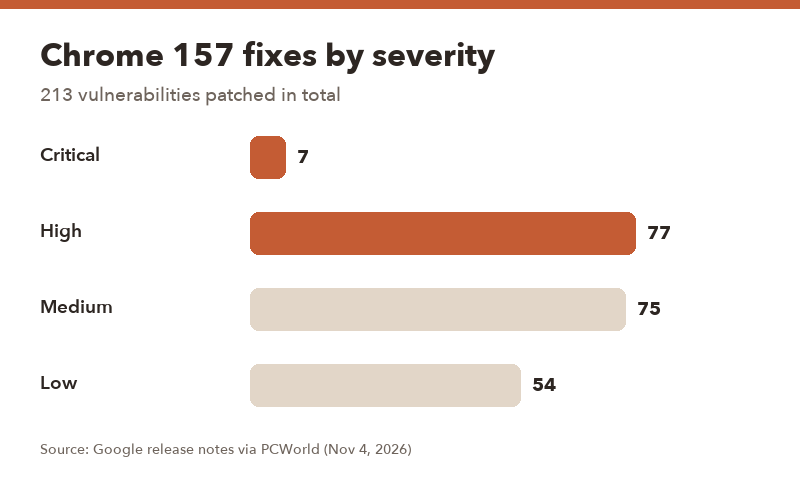
▲ 84 of the 213 fixes are rated critical or high.
- Google says none of the patched flaws have been exploited in the wild so far.
- That’s the good news. The less-good news: once fixes are public, attackers study them. Updating within a few days is the smart move.
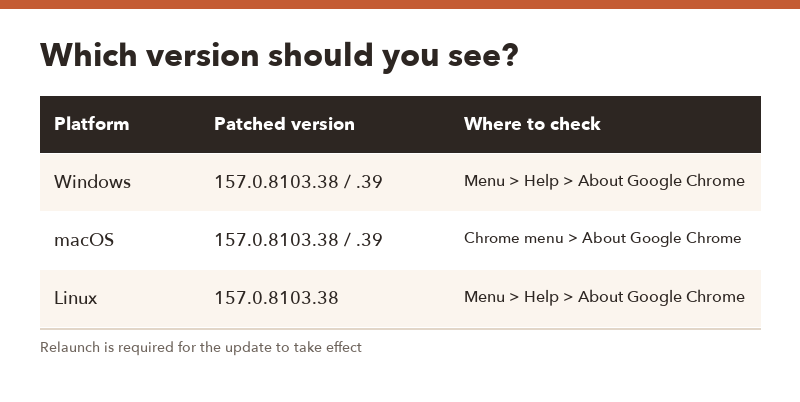
Which Chrome version should you have?
| Platform | Patched version |
|---|---|
| Windows | 157.0.8103.38 or 157.0.8103.39 |
| macOS | 157.0.8103.38 or 157.0.8103.39 |
| Linux | 157.0.8103.38 |
Anything starting with 156 or lower means you’re not protected yet. Google rolls updates out over several days, so it’s normal if yours hasn’t arrived the moment you check.
How to update Chrome in 4 steps
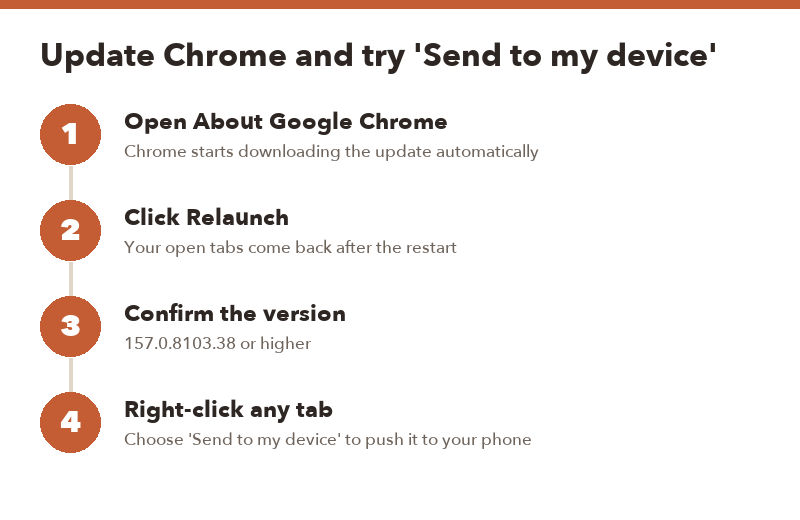
- Open the menu. Click the three dots in the top-right corner, then Help > About Google Chrome. (Settings > About Chrome works too.)
- Let it download. Chrome checks for updates as soon as that page opens.
- Click Relaunch. This is the step people skip. The update doesn’t protect you until Chrome restarts. Your tabs reopen afterward.
- Check the number again. You should see 157.0.8103.38 or higher.
Using Edge, Brave or Opera?
They’re all built on Chromium, the same code base as Chrome, so they usually get many of the same fixes shortly after. Open each browser’s About page and update it the same way.
The handy new trick: Send to my device
Chrome 157 also makes it easier to push a tab from your computer to your phone. Right-click any tab and choose Send to my device. The page pops up as a notification on your phone, ready to open.
On Android, you can go the other way: press and hold the address bar and pick the same option. That part has actually existed since Chrome 77 back in 2019, but plenty of people never noticed it. Every device needs to be signed in to Chrome with the same Google account.
When it’s fine to wait, and when it isn’t
- Fine to wait a day or two: your home PC, you mostly visit sites you trust, and Chrome usually auto-updates on its own.
- Update today: a work laptop, a shared family computer, or a PC where you never close the browser. Also if you handle banking or crypto in Chrome.
- Managed work device? Your IT team may control the timing. If About Chrome says updates are managed by your organization, ask them.
FAQ
Q. Does Chrome update by itself?
A. Yes, it downloads updates automatically, but it often waits for a restart to apply them. If you rarely close Chrome, relaunch it manually.
Q. Will I lose my tabs when I relaunch?
A. No. Chrome reopens the same windows and tabs after an update relaunch. Incognito tabs are the exception, since they close for good.
Q. When is the next Chrome version?
A. Chrome 158 is expected in about two weeks, following Google’s regular release schedule.
Q. Do I need to update Chrome on my phone too?
A. Yes. Update Chrome on Android through the Google Play Store and on iPhone through the App Store.