Table of Contents
Imagine installing an app you never even open, and a second later your phone restarts. Then again. And again. Safe mode doesn’t help either. The only way out is a factory reset that erases everything that wasn’t backed up.
That’s the scenario security firm Bitdefender demonstrated with a flaw it calls GhostMap. There’s no patch yet, so this guide focuses on what you can control: keeping that app off your phone, and making sure a reset wouldn’t cost you your photos.
What GhostMap is, in plain English
APK files, the packages Android apps come in, are basically ZIP archives. GhostMap exists because two parts of Android read ZIP compression settings differently. A specially malformed APK can slip past a size check, and when the system tries to read that entry, the process crashes with what’s called a SIGBUS error.
BleepingComputer reported Bitdefender’s findings on November 5, 2026. The scary part is how little the bad app needs:
- No permissions requested at install
- No executable code inside
- It doesn’t even need to be launched. Installing it is enough.
What happened in the test
Bitdefender tested on a Pixel 10 running Android 17 with the August 5 security patch. The crash loop began about one second after installation. It repeated 110 times in normal boot and 72 times in safe mode, and the loop also blocked normal access to safe mode itself.
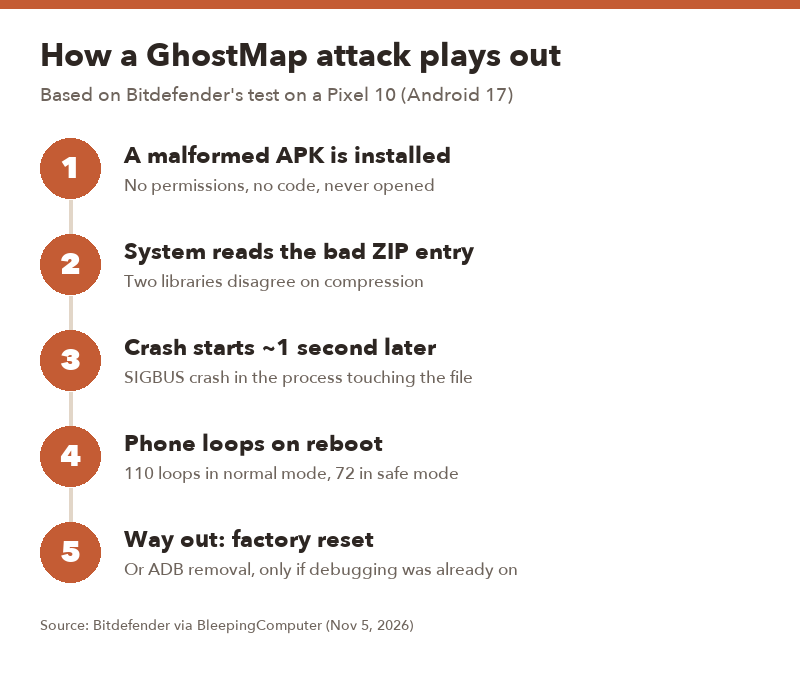
▲ The attack happens at install time, which is also the only point where you can stop it.
Is Google fixing it?
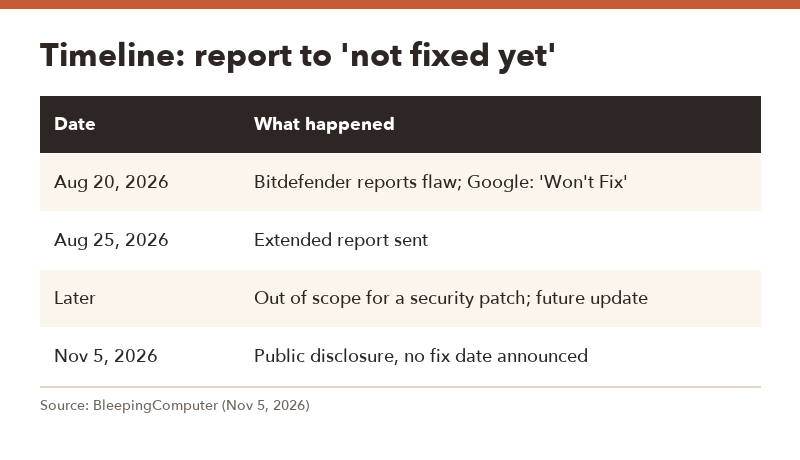
Not quickly, from what’s public. Bitdefender reported the issue on August 20 and initially got a “Won’t Fix (Not Reproducible)” response. After a more detailed report on August 25, Google said it was out of scope for a security update but kept it for consideration in a future release.
| Date | What happened |
|---|---|
| Aug 20, 2026 | Bitdefender reports GhostMap; Google marks it “Won’t Fix” |
| Aug 25, 2026 | Bitdefender sends an extended report |
| Later | Google: not a security-update item, may be handled in a future update |
| Nov 5, 2026 | Public disclosure; no fix date announced |
Bitdefender found this while studying an Android banking trojan that kept crashing its test emulators. Whether that malware used the trick on purpose isn’t clear, and there are no confirmed reports of widespread attacks.
If your phone is already stuck in a boot loop
Honestly, the options are limited. According to Bitdefender, there are two ways out:
- Factory reset. Boot into recovery mode (usually by holding Power and Volume Down on Pixels, or a similar combo on other brands) and wipe the device. This deletes everything stored only on the phone.
- Remove the file with ADB. This only works if USB debugging was already turned on before the problem, and you have to run the commands in the short window before the system crashes. It’s realistic for developers, not for most people.
Also keep in mind that random boot loops have plenty of other causes, like a failed update or a hardware problem. If it started right after installing an unfamiliar app, GhostMap-style behavior is a fair suspicion.
5 ways to protect yourself now
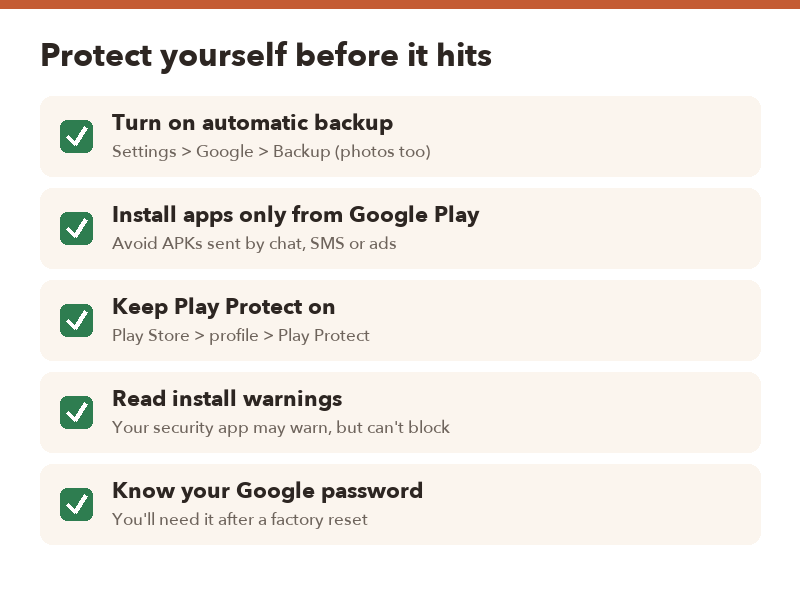
- Turn on automatic backup. Go to Settings > Google > Backup and make sure it’s on, and that Google Photos (or your gallery app) is backing up pictures. That turns a reset from a disaster into an annoyance.
- Stick to Google Play. Be wary of APK files sent through messaging apps, text messages, pop-up ads or “updated version” download sites.
- Keep Play Protect on. In the Play Store, tap your profile picture > Play Protect and confirm scanning is enabled.
- Take install warnings seriously. Bitdefender notes that third-party security apps may warn you, but they can’t block the install. You’re the last line of defense.
- Know your Google password and 2FA. After a reset, you’ll need them to restore your account and backup. Check now, not after.
FAQ
Q. Does GhostMap steal my data?
A. As described, it’s a crash-and-lockout problem, not data theft. The damage comes from the factory reset needed to recover, which wipes anything that wasn’t backed up.
Q. Which Android phones are affected?
A. The full range of affected versions hasn’t been published. Bitdefender’s demo used a Pixel 10 on Android 17, so assume recent Android phones may be at risk until Google says otherwise.
Q. Can apps from the Play Store do this?
A. Google Play’s review makes it less likely, but no store is perfect. The highest risk comes from APKs installed outside the Play Store.
Q. Will a security update fix it?
A. Google hasn’t announced a fix date. Keep installing monthly updates anyway, and watch for Google mentioning a fix in future release notes.