Table of Contents
If you picked OnePlus partly because of OxygenOS, this one stings a little. With Android 17, the OxygenOS name is officially going away. OnePlus phones that still get updates will run ColorOS instead.
So when does your phone get it, and should you worry? Here’s the November schedule, what actually changes, and a quick checklist to run before you hit install.
Why OxygenOS is going away
According to 9to5Google’s November 5 report, OxygenOS is “officially going away as of the Android 17 update.” It’s being framed as the last step in OnePlus becoming a fully integrated part of Oppo.
In practice, the change is mostly a name. Oppo and OnePlus merged their software teams a few years ago, and the two systems have looked nearly identical since. If your phone already felt like ColorOS with a different logo, well, that’s because it basically was.
ColorOS 17 rollout dates for November 2026
| Scheduled date | Device |
|---|---|
| November 5 | OnePlus 13R |
| November 17 | OnePlus 12 |
| November 18 | OnePlus Pad 3 |
| November 24 | OnePlus Open |
| November 26 | OnePlus Nord 6, OnePlus Nord CE 6 |
| December to Q1 2027 | 13 more devices, including OnePlus 12R, OnePlus 11 and OnePlus Pad 2 |
One thing to keep in mind: updates go out in waves. The date is when the rollout starts, not when every phone receives it. If you don’t see it on day one, give it a few days before assuming something’s wrong.
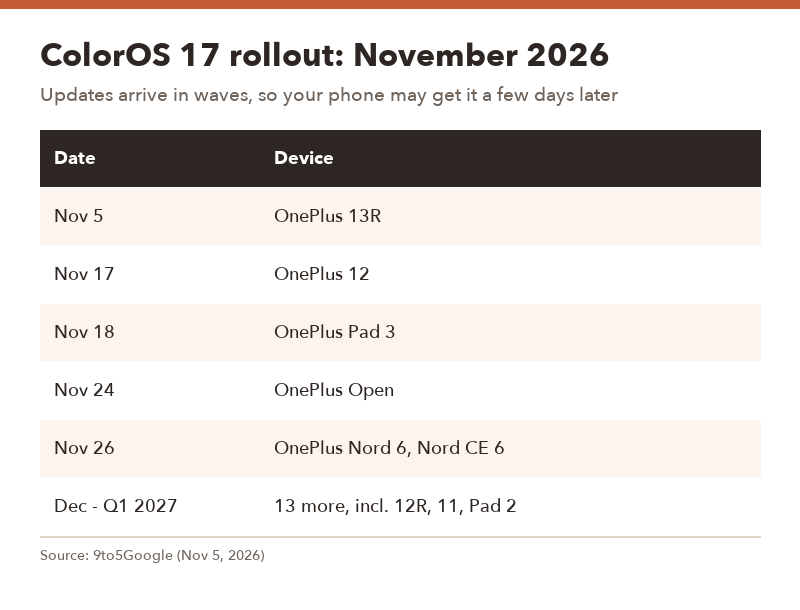
▲ Dates mark the start of each rollout wave.
What changes for you (and what doesn’t)
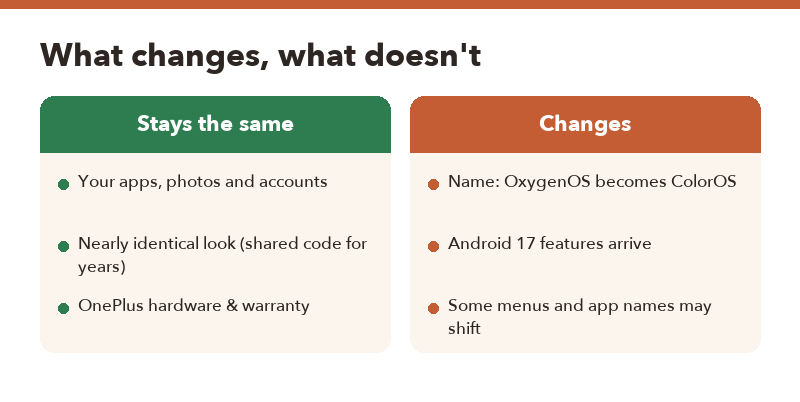
Stays the same
- Your apps, photos, messages and accounts carry over like any normal system update.
- The overall look and feel, since the two systems have shared code for years.
Changes
- The software name in Settings changes from OxygenOS to ColorOS.
- You get the Android 17 features and security updates.
- Some menu names or preinstalled app names may shift. That’s typical with any big version jump.
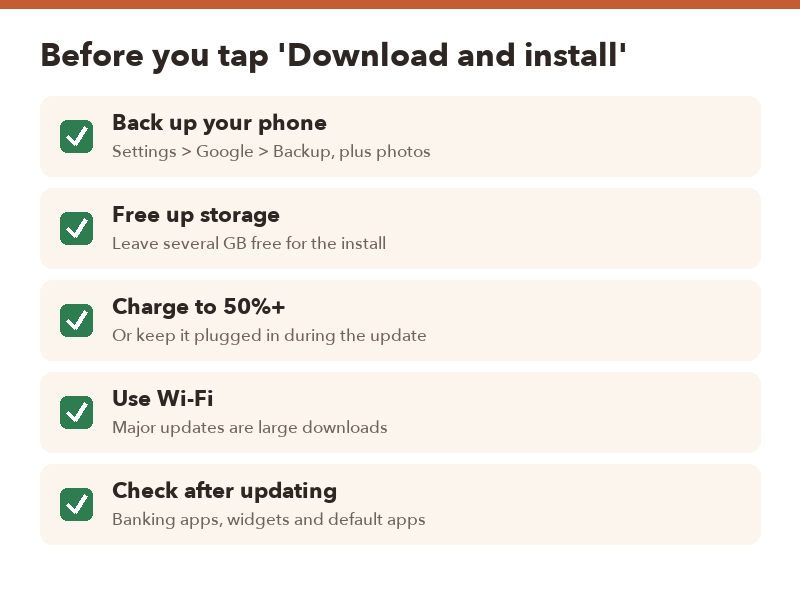
5 things to do before installing ColorOS 17
- Back up first. Check Settings > Google > Backup, and make sure your photos are syncing. Major updates rarely go wrong, but when they do, you’ll be glad.
- Free up storage. A full Android version update needs room to download and unpack. Leaving several gigabytes free avoids failed installs.
- Charge to at least 50%. Or just keep it plugged in while it updates.
- Use Wi-Fi. Big OS updates can be large downloads.
- Test your must-have apps afterward. Banking apps, authenticator apps, widgets and your default launcher are the first things to check.
How to check for the update
On your scheduled date, open Settings and look for the software or system update option, then tap to check. If nothing shows up, try again over the next several days.
Update now or wait a week?
- Update right away if you like new features and your phone isn’t your only work device.
- Wait about a week if you depend on your phone for work or banking. Early-wave bug reports usually surface fast.
- Don’t wait forever. Android 17 also brings security fixes, and staying on old software gets riskier over time.
FAQ
Q. Will I lose data when OxygenOS becomes ColorOS?
A. It’s delivered as a regular system update, so your data should stay put. Still, back up before any major version update.
Q. My OnePlus isn’t on the November list. Am I left out?
A. Not necessarily. 9to5Google says 13 more devices, including the OnePlus 12R, 11 and Pad 2, are expected in December and the first quarter of 2027.
Q. Can I stay on OxygenOS?
A. You can delay the update, but future Android versions and fixes for supported OnePlus devices will come as ColorOS.
Q. The date passed and I don’t have it. What now?
A. Rollouts happen in waves, so give it several days. Check that you’re on Wi-Fi and that you have enough free storage.